[Updated: 15 February, 2010]
wordpress theme systems

Premium WordPress template systems are not ordinary WordPress themes, they are powerful WordPress ‘theme frameworks’ that make it easy for anyone to run a professional, customized blog or website. These WordPress template systems offer a huge amount of built-in control and flexibility allowing you to create many different styles and layouts, and easily customize the template to build a unique looking website.

Below are the best premium WordPress template systems available. A simple screen shot of the base homepage of these themes does not do them justice, as they have a lot of features and options on the back end which can’t be fully shown here. Plus frankly it can be difficult to explain using words. So try the demos, watch the videos, and read the detailed features on the release pages to fully appreciate these template systems.

Thesis Theme

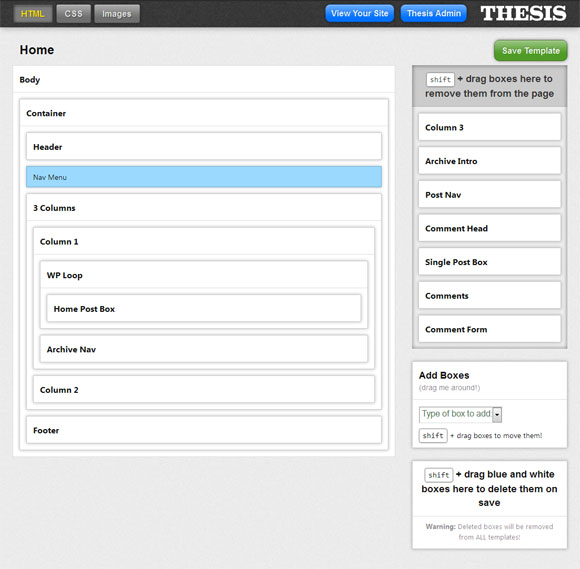
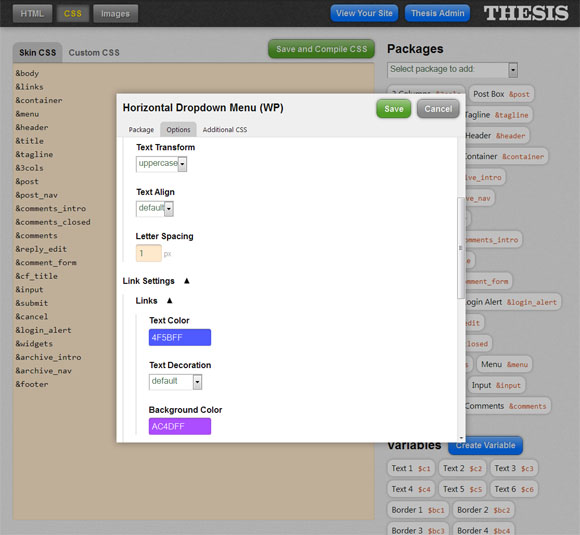
Thesis is a powerful, high quality WordPress master framework that makes it easy for anyone to run a professional, customized blog or website. In addition to excelling at critical tasks like SEO, site speed, and layout flexibility, Thesis comes with one of the most comprehensive Option Panels that allows you to easily control and customize almost every aspect of the framework with ease. You can select the font style and sizes, colours for most elements, the number of columns (1, 2 or 3 columns), the order of those columns and the exact width of each individual column – all without having to dig into the pages of code. Thesis also boats the strongest SEO of any WordPress theme. Some well know internet personalities and SEO “gurus” use Thesis.

thesis wordpress theme

If you think the base Thesis layout pictured above looks a bit minimalist and basic, you’re right, but check out some of the awesome Thesis customizations here.

Thesis Options
thesis-options

Thesis Design Options
design-options

Key Features

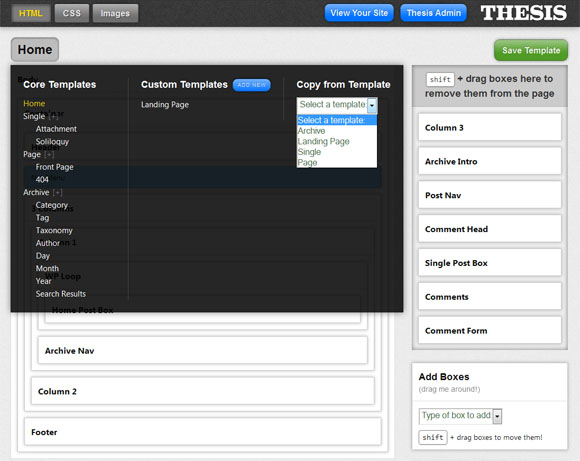
  • Thesis Options Panel – one of the most comprehensive theme options panel in a premium WordPress theme. Allows you to easily control and customise almost any aspect of the framework with ease. You can customise everything including, font styles, colours what you want to appear in the navigation menu, page titles, your RSS feed, what meta data shows on your post / page, how your archive page shows up etc.thesis-layout
  • Layout Options – Thesis gives you a multitude of column and width options to choose from. You can select the number of columns (1, 2 or 3 columns), the order of those columns and the exact width of each individual column – all without having to dig into the pages of code.
  • Features and Teasers – Thesis gives you an option called ‘features and teasers’ that allows you to have a front page that is more of a magazine style showing featured posts and short excerpts of other posts with thumbnails.
  • Colour Control – Thesis allows you change the colour of virtually every element of theme. Easy change text, border, link, background colours etc.
  • Automatic Thumbnail Generation – Thesis will automatically resize pictures and generate thumbnails for your posts.
  • No coding experience required – The Thesis option panels allow you to command your site with ease without requiring detailed knowledge of HTML, PHP or CSS.
  • Future Proof Customization System – Allows modifications with a custom style sheet meaning you can modify your theme and protect it against any future upgrades.
  • Less Plug-ins Required – some of the capabilities that you would normally use plug-ins for are built into the theme. For example SEO options, Google analytics or other header and footer code, navigation menu options etc can all be managed in the theme options panel. colours
  • Pixel Perfect Typography – Thesis has polished typography with finely-tuned geometrics for maximum legibility. You can select what type, and size, of font you want in all the different sections of the theme.
  • Hooks – Thesis has a custom hook architecture that allows you to add to, subtract from or modify the functionality of your Thesis installation. It allows you to isolate all of your custom changes to just two key files. This makes your Thesis installation easy to customize, and easy to upgrade.
  • Rich Style Classes – Thesis features built in classes to help you make important content stand out, and add some pizzazz to your site. You can add a drop-cap, alert box, a note box, or even wrap text around adsense ads etc.
  • Customisable Multimedia Box – Thesis includes an optional fully customizable multimedia box which can be used for rotating random images, video, advertising or your own custom code.
  • Search Engine Optimization – Thesis boasts the strongest SEO of any theme on the market today thanks to its expertly-coded HTML + CSS + PHP framework.
  • Support – Access to documentation and a great support forum managed by talented and helpful staff
  • Continuous Improvement – Thesis is continually being upgraded and improved and new featured added. When you purchase thesis you get access to lifetime updates.
  • Much Moreread about all Thesis features here

Price: Personal: $87, Developer: $164
Demo & Release Page | Download

Genesis WordPress Theme Framework

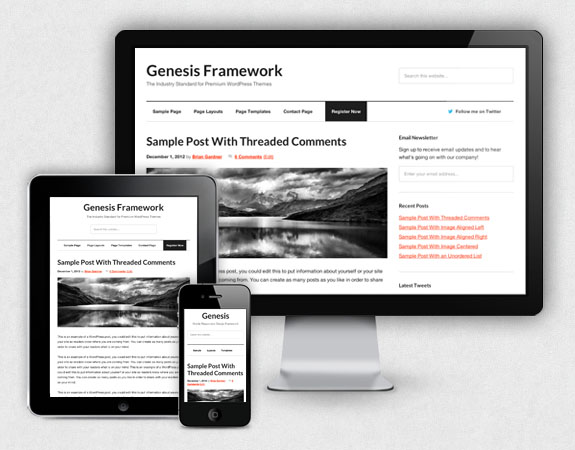
genesis theme framworkGenesis is an advanced WordPress theme framework from StudioPress. The Genesis Theme Framework is essentially a core WordPress theme with a considerable amount of inbuilt options and features which can be extended further with the use of child themes.

Why a theme framework? There are numerous benefits to using a framework such as Genesis for your website including: building on a solid core theme with quality code that includes a lot of inbuilt functionality which is continually being updated and improved, plus easier customisation that doesn’t break when new core theme updates are applied.

Core Theme
genesis theme framework

Layout Options
genesis layout options

There are a variety of pre-built child themes available for the Genesis framwork like the ones below.

Mocha Child Theme
mocha child theme

Executive Child Theme
executive child theme

Genesis Main Features

  • 6 Layout Options – selectable site wide or for individual post/page
  • 30 + hooks
  • Theme Options Panel
  • Dynamic Text / Image Logo option
  • Navigation menu controls
  • Custom Widgets
    • My Tweets
    • User Profile
    • eNews & Updates
    • Featured Posts
    • Featured Page
  • SEO Options (site wide and individual page/post controls)

Prices:
Genesis Theme Framework Package: $59.95
Executive Child Theme: $24.95
Mocha Child Theme: $24.95
Executive + Genesis Theme Package: $79.95
Mocha + Genesis Theme Package: $79.95
Pro Plus All-Theme Package: $199.95

Demo & Release Page | Download

Canvas

Canvas can be used as a clean and minimalistic WordPress theme or a fully featured theme framework. It has a huge amount of backend design control (90+ options) that allow you to easily customise every element of the theme to make the design, layout & typography exactly as you want. It also includes 5 different site width options, 6 layout options for the content/sidebars, custom widgets, custom navigation builder, and a child theme friendly structure with custom hooks to easily customise the theme via the use of child themes.

canvas wordpress theme

Layout Options
canvas layout options

General Styling Options
canvas styling options

Custom Navigation (drag and drop customisation)
woo custom navigation

Features

  • Customize any element – 90+ options to tweak colours, borders, font-sizes, font-families etc
  • Upload background & header imagery via the backend
  • Easy change site width – easily change between 5 different site widths (980, 960, 940, 880 and 760 pixels) and also an option to box your layout in.
  • 6 Layout Options – choose between 6 different layouts for and order of content/sidebars (full width, 2 col left, 2 col right, 3 col left, 3 col middle, 3 col right). Canvas also lets you specify individual layouts per post or page
  • Custom Widgets – Tabs, Flickr, Twitter, Adspace, Search etc
  • Child Theme Friendly – custom hooks makes it a lot easier to customize the theme via a child theme without touching any code in the main parent theme
  • Custom Navigation – allowing you full customization over how your navigation should be structured
  • Backend options panel – make simple changes without editing code, like adding your own logo, changing to an alternate colour style, adding Google Analytics code
  • Cross browser compatible
  • Auto-sizing thumbnails
  • Localized for translations
  • Custom page templates

Price: Standard: $70, Developer: $150
Demo & Release Page | Download

Headway WordPress Theme System

Headway is an extremely sophisticated, flexible and easy to use premium WordPress theme system which enables average WordPress users as well as developers / designers to create unique, great looking WordPress sites. The Headway theme system features a vast amount of options including an amazing visual layout editor that allows you to arrange elements on the fly using simple drag & drop to create anything from a standard blog, to landing pages, to membership sites, to e-commerce sites. The custom design editor allows you to customise just about every design element of the theme including the items and order of the navigation menu, colours, fonts, favicon and more. The configuration panel also allows you to edit everything behind the scenes including the most thorough SEO controls of any premium theme.

headway wordpress theme 1.5

Site Configuration Panel
The Site Configuartion Panel allows you to control the blog’s header, posts, comments, and footer settings, plus site dimensions. Features include: Site-Configuration

  • Easy uploading of your own header image
  • Turning on or off the display of elements such as your blog’s tagline or navigation links
  • Switching between a fixed-width header vs. a fluid one that spans the width of the browser window
  • Rearrange header elements by simply dragging them on the screen
  • Finely control post meta options, such as the publication date, author name display, number of comments, and more
  • Set the number of featured (full) posts for the blog’s main page compared to excerpts or just headlines
  • Choose normal or small excerpts (full-page width vs. a smaller “box”) — or no excerpts at all
  • Choose to display comments on pages or not
  • Choose to show commenter Gravatars or not, enter a URL for a custom default (blank) Gravatar, and set the avatar display size in your comments
  • Set fixed or fluid width footer
  • Choose to show or hide various footer elements, such as copyright, go to top link, login link, and more
  • Set site page dimensions and page margin

Navigation Panel
The Navigation Panel lets you control and fine-tune the navigation bar. Capabilities include: Navigation2

  • Show or hide subpages (also known as child pages) in your navigation bar
  • Hide the Home link, in case you don’t need it because you’re using the blog header only as the home link
  • Make any links in your navigation bar inactive so they don’t show (but the pages still exist)
  • Drag any link in the navigation bar to any position you want, until you have the link order you desire

Leaf Panel
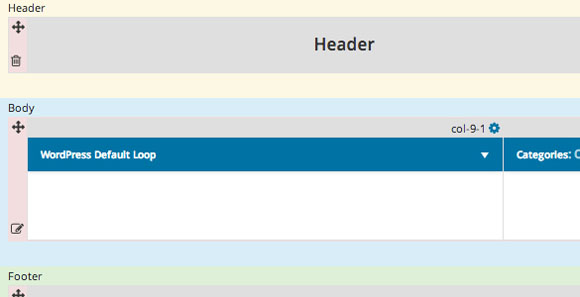
Headway’s Leaf Panel in the Visual Layout Editor gives you unprecedented control over the visual placement and dimensions of page content. Each leaf is a content box. You get to decide what goes into the box, where the box goes on the page, and how big the box is. You can add leafs, arrange them, resize them, delete them, and edit their settings. The kind of Leafs you can add to any page layout you want in Headway are: Leafs

  • Content Leaf: displays posts according to settings you choose, such as including or excluding certain categories and the number of posts to be displayed
  • Widget Ready Sidebar: add as many sidebars as you want in your layout—including the ability to have special “sideways sidebars” in the footer (which has, until Headway, always been a weak area in WordPress theme design)
  • Text/HTML/PHP Leaf: put custom content of any kind you want into this leaf: regular text, XHTML, PHP, and JavaScript (such as for email opt-in forms, for example), it can take just about anything
  • Featured Post Leaf: featured post leafs allow for animated transitions between a series of featured posts on your blog all within the same box
  • RSS/Recent Posts Leaf: grab any RSS feed from any source (including your own, of course) and display a specific number of recent posts from it with this powerful Leaf
  • Image Rotator Leaf: create an animated slideshow of images that gently fade one into another with this super-easy Leaf, and put it anywhere on the page you like
  • About Leaf: create a highly detailed “about” box on your page with text, an image (you control the size of the picture), and a “more” link
  • Photo Gallery Leaf: create amazing photo galleries for your blog with no extra WordPress plugins required—you have total control over every detail of the gallery, from thumbnail settings to slideshow animations

Visual Design Editor
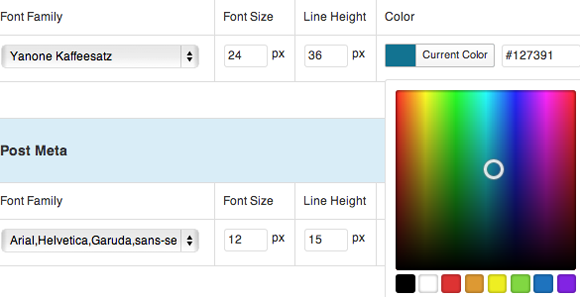
The Visual Design Editor allows you to fine-tune the visual design by changing fonts, margins, and other aspects universally of the leafs, sidebar widgets, and other WordPress blog elements. Some of the properties you can control for selected elements include: Visual-Design-Editor

  • Colors: you can use a visual color picker or enter a hexadecimal color code
  • Font/Typeface: choose from a list of nearly universal web fonts (found on all Macs and Windows computers)
  • Font Size: set the size of your text in pixels
  • Line Height: set how much vertical space is in between each line
  • Font Weight: set text as bold or normal
  • Text Transform: set text as being normal, uppercase, or lowercase
  • Font Variant: choose a “small caps” effect
  • Letter Spacing: adjust the amount of gap between the letters of words to wider or more narrow

Configuration Panel
The Configuation Panel lets you get at settings that are “behind the scenes,” so you can change what you want.

  • General Tab: Contains main blog settings for feeds, Google Analytics or other scripts, and more.
  • Styling/Features: If you want to disable the Visual Design Editor, then you can change your style and font settings here, via drop-downs and checkboxes.
  • Search Engine Optimization (SEO) Tab: Headway has the most thorough SEO features of any premium theme… all without any additional plugins. Here you can manage various kinds of page titles, description meta tags, nofollow settings, noindex settings, and more to boost your search engine rankings.
  • Social Networking Tab: You can integrate your Twitter account into your blog without extra plugins to bog down your blog’s page load times. You can have your tweets automatically appear in a leaf on the blog, and automatically tweet your new blog posts to Twitter as soon as they’re published.
  • Headway Permissions Tab: Have a multi-author blog or a team of designer/developers? Set their permissions for how much of Headway’s power they can access. You get to choose what type of user account (administrator, editor, etc.) has permission to see and use the various Headway tools, such as the Visual Design Editor or Headway Configuration. No other premium theme has these capabilities built in.

Support
Headway includes tutorials & documentation in plain English and a friendly and helpful support community

The power and flexibility of Headway Theme System can be a little difficult to comprehend with just words. To really appreciate the theme watch the video tour.

Price:
Personal: $87
Developer: $164

Demo & Release Page | Download

Elemental

Elemental is a full featured premium WordPress theme framework. The Elemental theme framework is supremely functional, giving you everything you need out of the box to build amazing websites. Elemental includes a comprehensive control panel to manage your website, 12 custom page templates, 11 custom widget areas, lots of filters & action hooks, automatic thumbnail resizing and much more.

Elemental Premium WordPress Theme Framework

Features

  • Comprehensive Control Panel – allows you to change every aspect of your website with ease
  • 12 Custom Page Templates which let you create contact forms, sitemaps, image galleries, blogrolls and more
  • 11 custom widgets
  • Stacks of Filters and Actions to increase child theme customisation potential
  • Complete breadcrumbs support, site wide
  • Auto-resizing thumbnails, and the ability to automatically grab thumbnail images from the post content (custom fields not required!)
  • A built in contact form with user definable email address, messages, and CAPTCHA to reduce spam
  • Support for the WP125 advertising plugin for full control of the adverts on running on the blog
  • Elegant, animated, multi-level dropdown menus for pages and categories
  • Code to prevent content redundancy across the site – no 2 posts will appear simultaneously
  • Print-friendly options on single-post pages
  • Four widgetized regions with optional advertising
  • Support for gravatars, author comment highlighting, threaded comments and paged comments
  • Full WordPress MU support
  • SEO optimized
  • Print.css stylesheet
  • Access to 1 to 1 support

Price:
Basic License: $59.99
Developer: $149.99

Demo & Release Page | Download

Flexx Theme

Flexx is a powerful, flexible and easy to use WordPress theme systems from iThemes. Flexx features 1,056 possible layout combinations which you can pick and choose with a mouse click, allowing you to build almost any kind of WordPress site you want, from simple landing pages to complex blog sites. The Flexx series comes in a variety of pre-built colour styles, and also features rotating header image, Plug and Play Graphic Changes, and a Menu Builder allowing you to pick and choose what Pages you want in the menu navigation, including subpages.

flexx theme

Features

  • 1,056 possible layout combinations – Pick and choose your layout with a mouse click
  • Rotating header images – Easily upload your new header images and set the Flash-like transition effects
  • Contact Form Page Template – The custom image uploader feature allows you to personalize your site with your own logo
  • Plug and Play Graphic Changes – Easily change the look of your site by uploading new background images (setting every different combo with it) and setting the color through a Photoshop-like color picker.
  • Menu Builder – Pick and choose what Pages you want in the menu navigation, including subpages.
  • Search Engine Optimization – As with all our themes, we’ve built it to get you the best exposure in the search engines, and include a SEO panel to tweak some basic settings.
  • Colour Options – Flexx has a rockin’ feature that lets you easily upload new background images (setting every different combo with it) and setting the colour through a Photoshop-like colour picker.
  • Drop down navigation menu

To fully appreciate the power and flexibility of the Flexx Theme visit the theme release page and try the Flexx Theme demo to see the other layout possibilities.

Price
Single Use: $79.95
Developer: $249.95
The Flexx Theme comes in a variety of colour styles and a Multi Use Combo Pack

Demo & Release Page | Download

Affiliate Theme

Affiliate Theme is a powerful WordPress site creation tool design specifically for affiliate marketers or others wanting to create dynamic CMS websites. The Affiliate Theme from Unique Blog Designs allows you to easily build a wide variety of dynamic landing pages and websites using WordPress. The WordPress Affiliate theme gives you the ability to change every tiny look and feel of the theme with a simple click to create branded sites in a few minutes. The Affiliate Theme Options Panel allows you to easily change the colours, fonts, call to action buttons, header graphic, navigation style, the page layout and more. To appreciate the power of this theme watch the Affiliate Theme intriduction video.

UBD is currently running a promotion that will give you 50% off Squeeze Theme if you buy Affiliate Theme between now and Tuesday, November 17th.

Example Website Layout
affiliate marketing theme for wordpress

Theme Options
theme-options

Features

  • Layout Options – The theme has six (6) pre built effective multi-post layouts. With a single click you can change the entire layout from 1-column, 2-column, 3-column, 4-column, left-column sidebar or right-column sidebar.
  • Options Panel – the powerful Affiliate Theme Options Panel allows you to change the layout, logo, colours, fonts, background, header graphic, even rollover button colour – all without touching a single line of code. If you are a code-head, you will dig the clean XHTML + CSS + PHP, fully commented source code. An advanced customization guide is included for people who want to get extra friendly with Affiliate Theme.
  • Built-in Color Picker – An advanced “Photoshop-like” colour picker makes it easy for you to change Affiliate Theme to any colour scheme you want! You can change the color of everything from post headlines to button rollovers and site background.
  • No coding required – Affiliate Theme allows you to change all aspects of the theme without needing to dive into the code. The theme makes it as easy as possible for you to build dynamic sites that require no skill to modify.
  • Optimized for PPC and SEO – The Affiliate Theme has been coded to improve the SEO (search engine optimization) over the standard WordPress theme with proper use of header, alt, title and META tags etc.
  • Easily insert tracking code – you can easily insert tracking code and scripts from the Theme Options panel without needing to hack your theme.
  • Lifetime access to Resource Center and support – includes video tutorials, extensive knowledge base, and support forum.
  • And a whole lot more – watch the Affiliate Theme video to learn more

Price:
Single-Use: $97
Multiple-Use: $147
Developer’s: $197

Demo & Release Page | Download

WordPress Remix CMS Theme

WordPress Remix is a WordPress master framework that allows you to use WordPress as a content management system (CMS). WP Remix is completely customizable, with WYSIWYG page template editing, and many different layout options to choose from.

It features over 50 page layout options including: a blog layout, 10 homepage options, 20 single page with different layouts, 10 product/gallery page and 5 miscellaneous pages. WP Remix 2 is the only WordPress theme available that offers WYSIWYG page template editing, allowing you to create and edit pages in the visual editor like a CMS. The theme also features 7 color schemes, Ajax slider, Smart Drop menu, Tabs, Tables, and even comes with a free PHPBB3 forum template.

A couple of screen shots of different layout options are show below, but check out the videos and WP Remix demo to test the huge range of page layouts and options that are possible with this system.

Home Page Option
WP Remix 2

Home Page Option
wpremix 2 theme

Page Layout Option
wp remix 2

Page Option with Tables
WP Remix 2 Page

Features:

  • WYSIWYG Page editor: Insert and edit page template directly from visual editor. A complete CMS experience.
  • Over 50 Page Templates: Choose from over 50 pre-structured, strategically built page templates that covers almost every layout possibility.
  • Flexibility: Create different pages and have same sidebar, header, footer for all pages or you can have them different for each of them!
  • Smart Drop Menu: The smart drop menu in wpremix 2 remembers exactly where you are and where you came from!
  • Dynamic Codes: Insert and execute PHP and Java script codes from visual editor following WP Remix code guide.
  • Add-on modules: Built in such way, it accommodates add-on modules that you can use to empower WP Remix. such as shopping cart, dynamic gallery, magazine module.
  • 7 Color Schemes: Simply select one of your choice from theme admin options
  • Theme Admin options: You don’t have to mess with the theme code. Set basic options directly from theme admin options such as Color Scheme, Feedburner ID, Flickr Id.
  • Ad Monetization: The sidebars, blog and magazine module has strategic ad place holders that you can use to sell ad space or promote your own products.
  • Grid Based Layouts: The theme and page templates has been built according to 18 column grid that make your designs not only more beautiful and legible, but more usable.
  • Famous Plugins Compatible: It is pre-configured and pre-formatted for the famous plugins like Contact-Form[ ], Page Navi, Gravatar, Flickrss, Post Rating, Author Highlight.
  • Clean, crisp design and typography
  • Contact Form
  • SEO ready
  • Widget ready
  • Printable Pages
  • Support Forum
  • Pre styled HTML Elements
  • Documented Theme Guide PDF
  • Free Technical Upgrades
  • W3C valid, Cross browser Compatible

Price:
Single Use: $75
Multiple Use: $275

Demo & Release Page | Download

Builder

The Builder theme from iThemes is a powerful and flexible tool to build WordPress themes. Builder allows you to create a website with multiple layouts, widget areas and individual looks on the fly thanks to its powerful Layout Editor. With Builder you can create different layouts for each type of WordPress view (e.g. create specific layouts for blogs, pages, posts, even categories), plus you can even create multiple custom layouts for specific posts or pages. Take the video tour of Builder to fully experience the power of this tool.

Key Features & Benefits

  • One theme for almost every project
  • Build almost any kind of new layout or page template you want in minutes (without knowing code)
  • Use one theme to build a website with multiple layouts and individual looks for each (each layout can have its own CSS)
  • Assign specific layouts to certain WordPress views (create specific layouts for blogs, pages, posts, even categories)
  • Create new widgets areas layouts or sidebars on the fly
  • Have special landing pages, squeeze pages, email opt in pages, feed pages, portfolio pages – in ONE theme!
  • Navigation Menu Builder – select which pages and categories you would like to include in menus
  • Integrated Billboard advertisement management module

Builder Layout Editor
builder layout editor

Example Layouts
builder theme layouts

Price: Builder Theme Core – $127
Demo & Release Page | Download

More Premium WordPress Theme Galleries

Best Magazine & News Premium WordPress Themes
Best Business & CMS Premium WordPress Themes
Best Video & Multimedia Premium WordPress Themes
Best Blog Premium WordPress Themes
Best Portfolio / Photo Gallery WordPress Themes
Best of the Best Premium WordPress Themes
Best Minimalist WordPress Themes

No Responses to “Premium WordPress Template Systems”

Leave a Comment